【版权声明】版权所有,请勿转载!
作者:厦门大学计算机系林子雨副教授
E-mail: ziyulin@xmu.edu.cn
【相关文章推荐】《大数据软件安装和基础编程实践指南》,详细指导VirtualBox、Ubuntu、Hadoop、HDFS、HBase、Hive、MapReduce、Spark、Flink的安装和基础编程
本博客内容与林子雨编著《大数据技术原理与应用(第5版)》(访问教材官网)教材配套。
本指南介绍了Flink2.3.0的安装和使用方法,采用Java编程语言。
备注:在安装Flink2.3.0之前,请首先在Ubuntu24.04中安装JDK17和Hadoop3.5.0。
一、安装Flink
Flink的运行需要Java环境的支持,因此,在安装Flink之前,请先参照相关资料安装Java环境(如JDK17,如果在学习第2章时已经安装了JDK17,这里就不用重复安装)。然后,到Flink官网下载Flink安装文件。也可以访问本书官网,进入“下载专区”,在“软件”目录下找到文件flink-2.3.0-bin-scala_2.12.tgz并下载到本地。假设下载后的安装文件被保存在Linux系统的“~/Downloads”目录下,执行以下命令对安装文件进行解压缩:
$ cd ~/Downloads
$ sudo tar -zxvf flink-2.3.0-bin-scala_2.12.tgz -C /usr/local
修改目录名称,并设置权限,命令如下:
$ cd /usr/local
$ sudo mv ./flink-2.3.0 ./flink
$ sudo chown -R hadoop:hadoop ./flink
Flink对于本地模式是“开箱即用”的,如果要修改Java运行环境,可以修改“/usr/local/flink/ conf/flink-conf.yaml”文件中的env.java.home参数,将其设置为本地Java的绝对路径。
执行以下命令添加环境变量:
vim ~/.bashrc在.bashrc文件中添加以下内容:
export FLNK_HOME=/usr/local/flink
export PATH=$FLINK_HOME/bin:$PATH
保存并关闭.bashrc文件,执行以下命令让配置文件生效:
source ~/.bashrc执行以下命令启动Flink:
cd /usr/local/flink
./bin/start-cluster.sh
执行jps命令查看进程:
jps
8660 TaskManagerRunner
9333 Jps
8383 StandaloneSessionClusterEntrypoint
如果能够看到TaskManagerRunner和StandaloneSessionClusterEntrypoint这两个进程,就说明Flink启动成功。
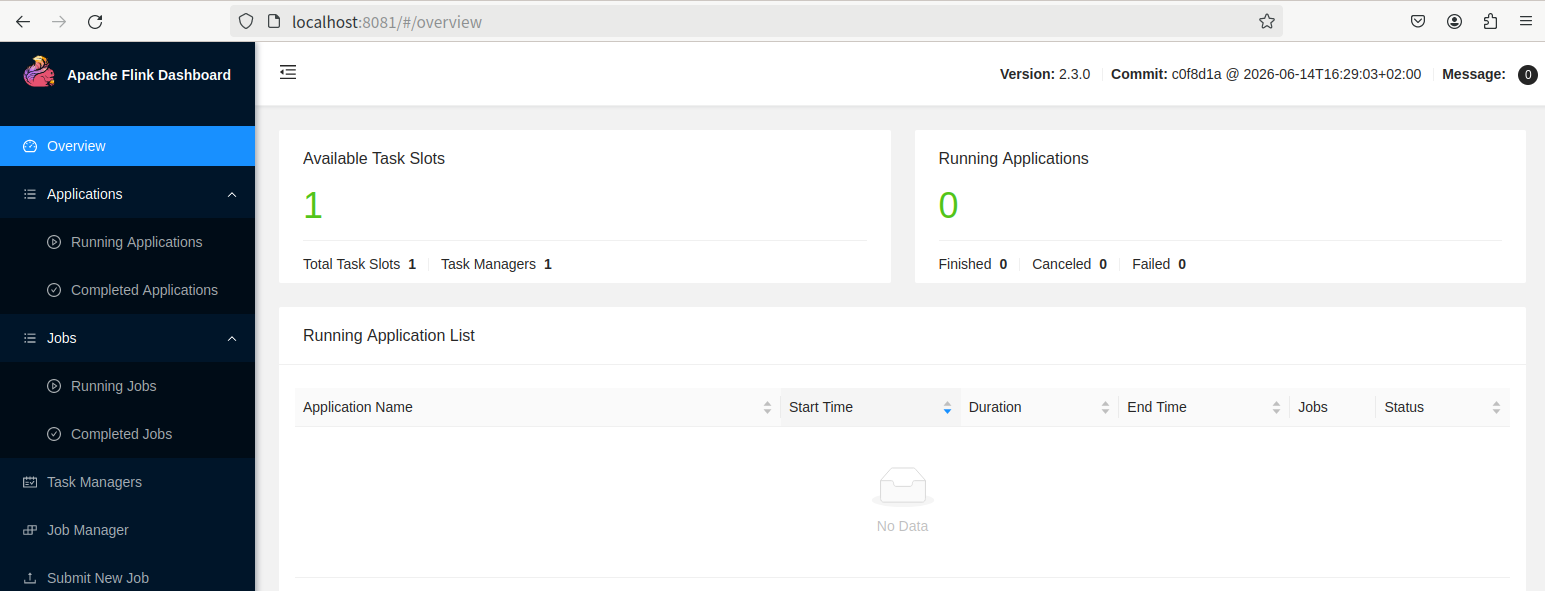
Flink的JobManager同时会在8081端口上启动一个Web前端,可以在浏览器的地址栏中输入“http://localhost:8081”并按“Enter”键来访问Flink的Web管理页面(如下图所示)。
Flink安装文件中自带了测试样例,这里可以运行WordCount测试样例程序来测试Flink的运行情况。首先在Flink安装目录下新建一个mydata子目录,在mydata目录中创建一个word.txt文件,在该文件中输入一些英文句子,用来做词频统计。然后,执行如下命令进行词频攻击:
cd /usr/local/flink
./bin/flink run ./examples/streaming/WordCount.jar --input ./mydata/word.txt --output ./mydata
如果上述命令执行成功,则可以看到屏幕上出现类似以下的信息:
Job has been submitted with JobID 5811149127ba9801faeb9c58562025a2
Program execution finished
Job with JobID 5811149127ba9801faeb9c58562025a2 has finished.
Job Runtime: 388 ms
然后,在mydata目录下,就可以看到输出的词频统计结果。
可以使用如下命令停止运行Flink:
cd /usr/local/flink
./bin/stop-cluster.sh
二、编程实现WordCount程序
编写WordCount程序主要包括以下几个步骤。
(1)安装Maven。
(2)编写代码。
(3)使用Maven打包Java程序。
(4)通过flink run命令运行程序。
1.安装Maven
Ubuntu没有自带Maven安装文件,需要手动下载并安装Maven。我们可以访问Maven官网下载安装文件。
下载Maven安装文件以后,将其保存到“~/Downloads”目录下。然后,我们可以选择将其安装在“/usr/local/maven”目录中,命令如下:
$ sudo unzip ~/Downloads/apache-maven-3.10.0-bin.zip -d /usr/local
$ cd /usr/local
$ sudo mv apache-maven-3.10.0/ ./maven
$ sudo chown -R hadoop ./maven
2.编写代码
在Linux终端窗口中执行以下命令,在用户主文件夹下创建一个文件夹flinkapp作为应用程序根目录:
cd ~ #进入用户主文件夹
mkdir -p ./flinkapp/src/main/java
然后,使用Vim编辑器在“./flinkapp/src/main/java”目录下建立代码文件WordCountData.java、WordCountTokenizer.java和WordCount.java。
WordCountData.java用于提供原始数据,其内容如下:
package cn.edu.xmu;

import org.apache.flink.streaming.api.datastream.DataStream;
import org.apache.flink.streaming.api.environment.StreamExecutionEnvironment;

public class WordCountData {
    public static final String[] WORDS = new String[] {
            "To be, or not to be, --that is the question:--",
            "Whether 'tis nobler in the mind to suffer",
            "The slings and arrows of outrageous fortune",
            "Or to take arms against a sea of troubles, ",
            "And by opposing end them?--To die, --to sleep, --",
            "No more; and by a sleep to say we end",
            "The heartache, and the thousand natural shocks",
            "That flesh is heir to, --'tis a consummation",
            "Devoutly to be wish'd. To die, --to sleep; --",
            "To sleep! perchance to dream:--ay, there's the rub; ",
            "For in that sleep of death what dreams may come, ",
            "When we have shuffled off this mortal coil, ",
            "Must give us pause: there's the respect",
            "That makes calamity of so long life; ",
            "For who would bear the whips and scorns of time, ",
            "The oppressor's wrong, the proud man's contumely, ",
            "The pangs of despis'd love, the law's delay, ",
            "The insolence of office, and the spurns",
            "That patient merit of the unworthy takes, ",
            "When he himself might his quietus make",
            "With a bare bodkin? who would these fardels bear, ",
            "To grunt and sweat under a weary life, ",
            "But that the dread of something after death, --",
            "The undiscover'd country, from whose bourn",
            "No traveller returns, --puzzles the will, ",
            "And makes us rather bear those ills we have",
            "Than fly to others that we know not of?",
            "Thus conscience does make cowards of us all; ",
            "And thus the native hue of resolution",
            "Is sicklied o'er with the pale cast of thought; ",
            "And enterprises of great pith and moment, ",
            "With this regard, their currents turn awry, ",
            "And lose the name of action.--Soft you now!",
            "The fair Ophelia!--Nymph, in thy orisons",
            "Be all my sins remember'd."
    };

    private WordCountData() {
    }

    public static DataStream<String> getDefaultTextLineDataStream(StreamExecutionEnvironment env) {
        return env.fromElements(WORDS);
    }
}
WordCountTokenizer.java用于切分句子,其内容如下:
package cn.edu.xmu;

import org.apache.flink.api.common.functions.FlatMapFunction;
import org.apache.flink.api.java.tuple.Tuple2;
import org.apache.flink.util.Collector;

public class WordCountTokenizer implements FlatMapFunction<String, Tuple2<String, Integer>> {
    @Override
    public void flatMap(String value, Collector<Tuple2<String, Integer>> out) {
        String[] tokens = value.toLowerCase().split("\\W+");

        for (String token : tokens) {
            if (!token.isEmpty()) {
                out.collect(Tuple2.of(token, 1));
            }
        }
    }
}
WordCount.java用于提供主函数,其内容如下:
package cn.edu.xmu;

import org.apache.flink.api.common.RuntimeExecutionMode;
import org.apache.flink.api.java.tuple.Tuple2;
import org.apache.flink.streaming.api.datastream.DataStream;
import org.apache.flink.streaming.api.environment.StreamExecutionEnvironment;

public class WordCount {
    public static void main(String[] args) throws Exception {
        StreamExecutionEnvironment env = StreamExecutionEnvironment.getExecutionEnvironment();
        env.setRuntimeMode(RuntimeExecutionMode.BATCH);

        DataStream<Tuple2<String, Integer>> counts = WordCountData.getDefaultTextLineDataStream(env)
                .flatMap(new WordCountTokenizer())
                .keyBy(wordWithCount -> wordWithCount.f0)
                .sum(1);

        counts.print();
        env.execute("WordCount");
    }
}
WordCount程序依赖Flink Java API,因此,我们需要通过Maven进行编译、打包。我们使用Vim编辑器在“~/flinkapp”目录中新建文件pom.xml,命令如下:
cd ~/flinkapp
vim pom.xml
在pom.xml文件中添加以下内容,以声明该独立应用程序的信息以及该程序与Flink的依赖关系:
<project xmlns="http://maven.apache.org/POM/4.0.0"
         xmlns:xsi="http://www.w3.org/2001/XMLSchema-instance"
         xsi:schemaLocation="http://maven.apache.org/POM/4.0.0 https://maven.apache.org/xsd/maven-4.0.0.xsd">
  <modelVersion>4.0.0</modelVersion>

  <groupId>cn.edu.xmu.dblab</groupId>
  <artifactId>wordcount</artifactId>
  <version>1.0</version>
  <packaging>jar</packaging>
  <name>WordCount</name>

  <properties>
    <flink.version>2.3.0</flink.version>
    <maven.compiler.release>17</maven.compiler.release>
    <project.build.sourceEncoding>UTF-8</project.build.sourceEncoding>
  </properties>

  <dependencies>
    <dependency>
      <groupId>org.apache.flink</groupId>
      <artifactId>flink-streaming-java</artifactId>
      <version>${flink.version}</version>
    </dependency>
    <dependency>
      <groupId>org.apache.flink</groupId>
      <artifactId>flink-clients</artifactId>
      <version>${flink.version}</version>
    </dependency>
    <dependency>
      <groupId>org.apache.flink</groupId>
      <artifactId>flink-runtime</artifactId>
      <version>${flink.version}</version>
    </dependency>
    <dependency>
      <groupId>org.slf4j</groupId>
      <artifactId>slf4j-simple</artifactId>
      <version>1.7.36</version>
      <scope>runtime</scope>
    </dependency>
  </dependencies>

  <build>
    <plugins>
      <plugin>
        <groupId>org.apache.maven.plugins</groupId>
        <artifactId>maven-compiler-plugin</artifactId>
        <version>3.13.0</version>
      </plugin>
      <plugin>
        <groupId>org.codehaus.mojo</groupId>
        <artifactId>exec-maven-plugin</artifactId>
        <version>3.5.0</version>
        <configuration>
          <mainClass>cn.edu.xmu.WordCount</mainClass>
        </configuration>
      </plugin>
      <plugin>
        <groupId>org.apache.maven.plugins</groupId>
        <artifactId>maven-shade-plugin</artifactId>
        <version>3.6.0</version>
        <executions>
          <execution>
            <phase>package</phase>
            <goals>
              <goal>shade</goal>
            </goals>
            <configuration>
              <createDependencyReducedPom>false</createDependencyReducedPom>
              <transformers>
                <transformer implementation="org.apache.maven.plugins.shade.resource.ManifestResourceTransformer">
                  <mainClass>cn.edu.xmu.WordCount</mainClass>
                </transformer>
              </transformers>
            </configuration>
          </execution>
        </executions>
      </plugin>
    </plugins>
  </build>
</project>
3.使用Maven打包Java程序
为了保证Maven能够正常运行,首先执行以下命令检查整个应用程序的文件结构:
cd ~/flinkapp
find .
文件结构应该与以下内容类似:
.
./src
./src/main
./src/main/java
./src/main/java/WordCountData.java
./src/main/java/WordCount.java
./src/main/java/WordCountTokenizer.java
./pom.xml
接下来,我们可以通过以下代码将整个应用程序打包成JAR包(注意,计算机需要保持连接网络的状态,而且首次执行打包命令时,Maven会自动下载依赖包,需要消耗几分钟的时间):
cd ~/flinkapp    #一定要把这个目录设置为当前目录
/usr/local/maven/bin/mvn package
如果屏幕上出现的返回信息中包含“BUILD SUCCESS”,则说明JAR包成功生成。
4.通过flink run命令运行程序
使用如下命令启动Flink:
cd /usr/local/flink
./bin/start-cluster.sh
然后,可以将生成的JAR包通过flink run命令提交到Flink中运行(请确认已经启动Flink),命令如下:
cd ~/flinkapp    #一定要把这个目录设置为当前目录
/usr/local/flink/bin/flink run --class cn.edu.xmu.WordCount ./target/wordcount-1.0.jar
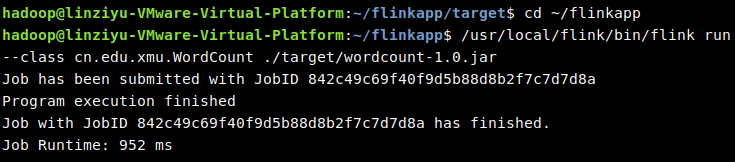
如果上述命令执行成功,可以在屏幕上看到如下图所示的结果。
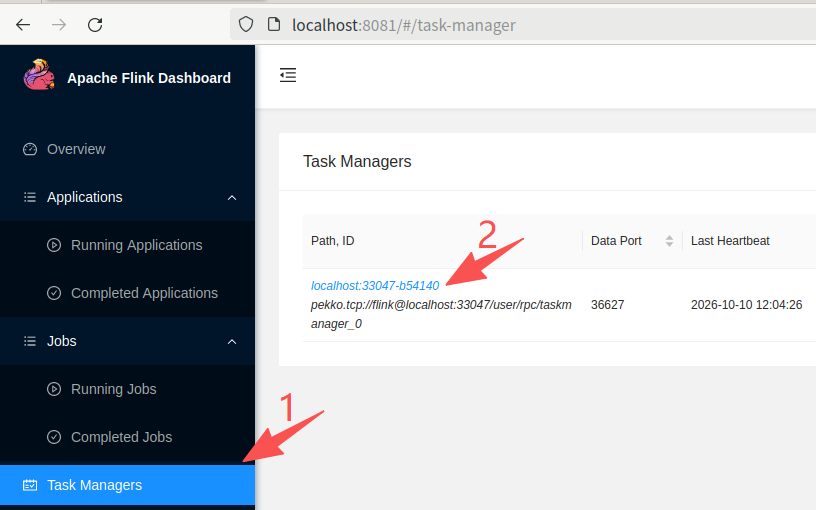
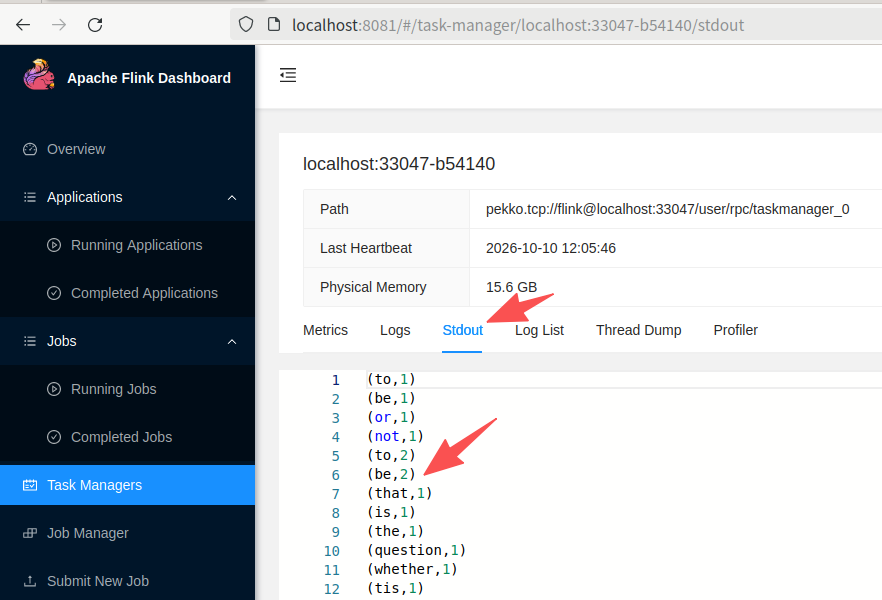
这时可以到浏览器中查看词频统计结果。在Linux系统中打开一个浏览器,在其地址栏中输入“http://localhost:8081”并按“Enter”键,进入Flink的Web管理页面,然后,单击左侧的“Task Managers”,右边会弹出新页面,在页面中单击“Path,ID”下面的链接,如下图所示。
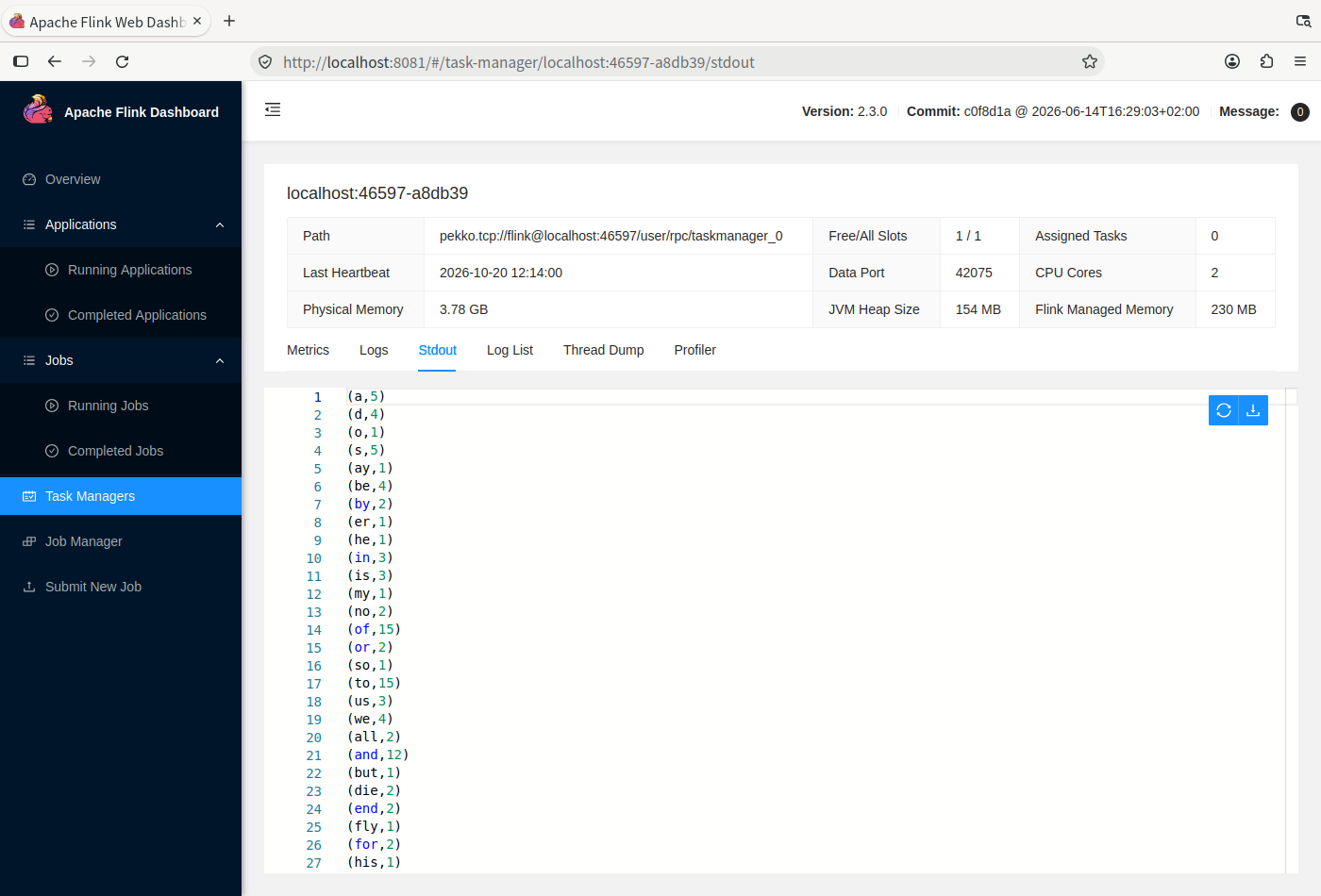
我们会看到如下图所示的新页面,在这个页面中,单击“Stdout”,就可以看到词频统计结果了。
三. 使用TRAE开发和运行WordCount程序
下面介绍在TRAE中打包和运行上述WordCount程序的方法。
1. 安装扩展并打开项目
配置好Maven环境变量后,启动或重新启动TRAE,进入IDE界面。点击左侧“扩展”图标,或按Ctrl+Shift+X,搜索并安装Microsoft发布的Extension Pack for Java。该扩展包包含Maven for Java;在扩展中搜索Maven for Java,确认其已安装并启用。
Maven for Java用于提供Maven面板,打包时调用前面安装的Maven。
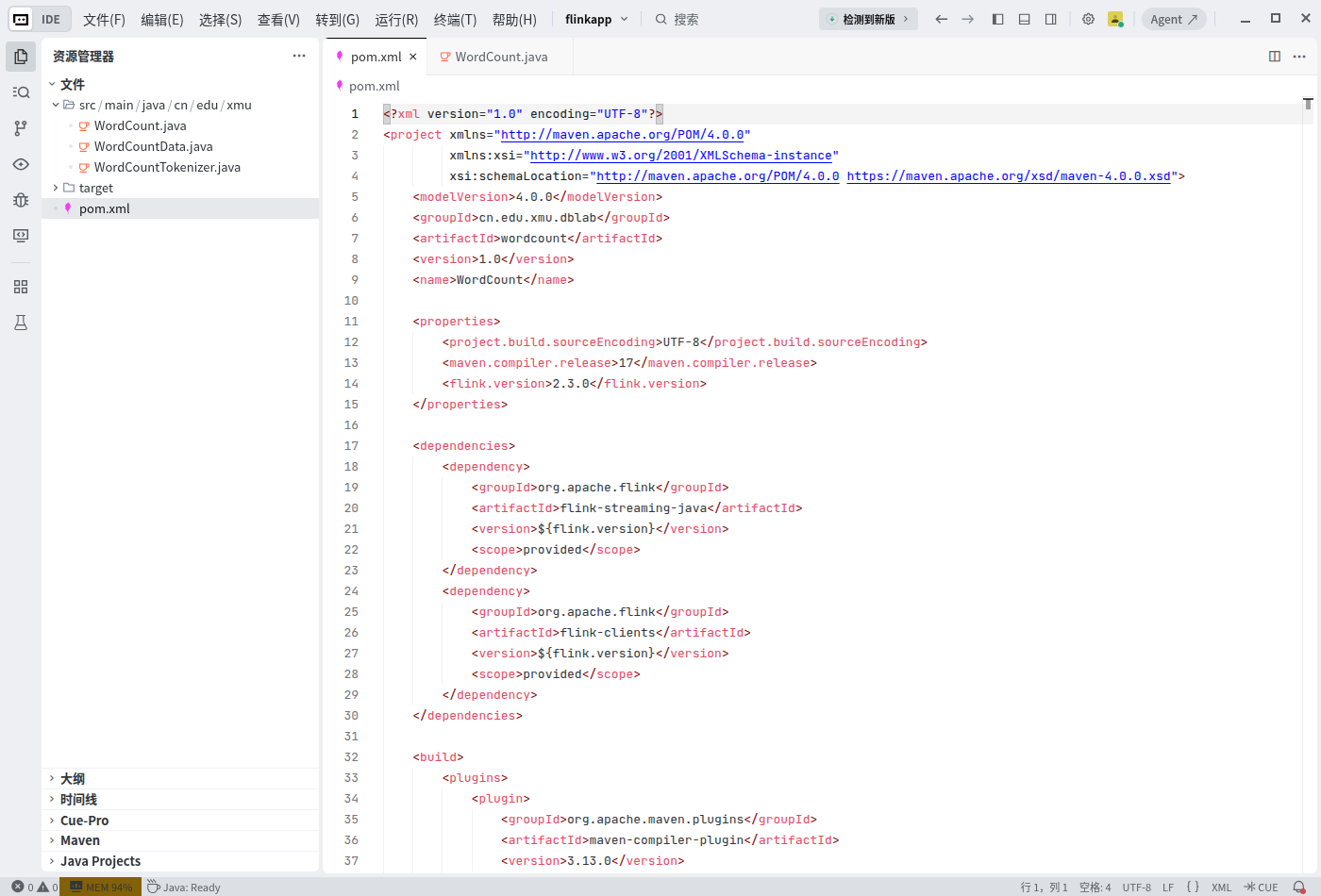
在TRAE中选择“文件”→“打开文件夹”,选择/home/hadoop/flinkapp。左侧资源管理器应能看到pom.xml和src目录。展开目录并打开pom.xml,核对Flink依赖版本为2.3.0。
等待Java项目加载完成,状态栏显示“Java: Ready”。
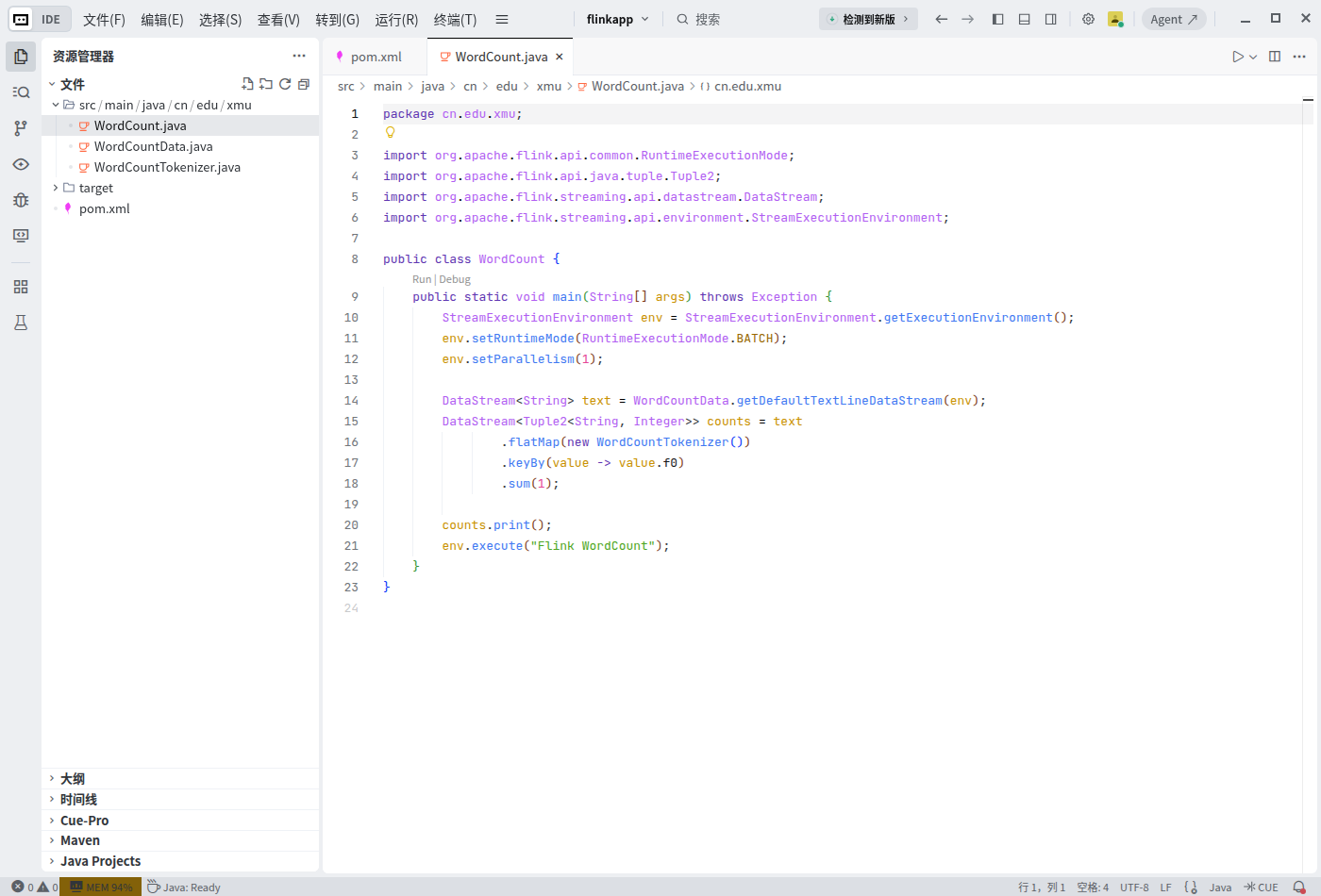
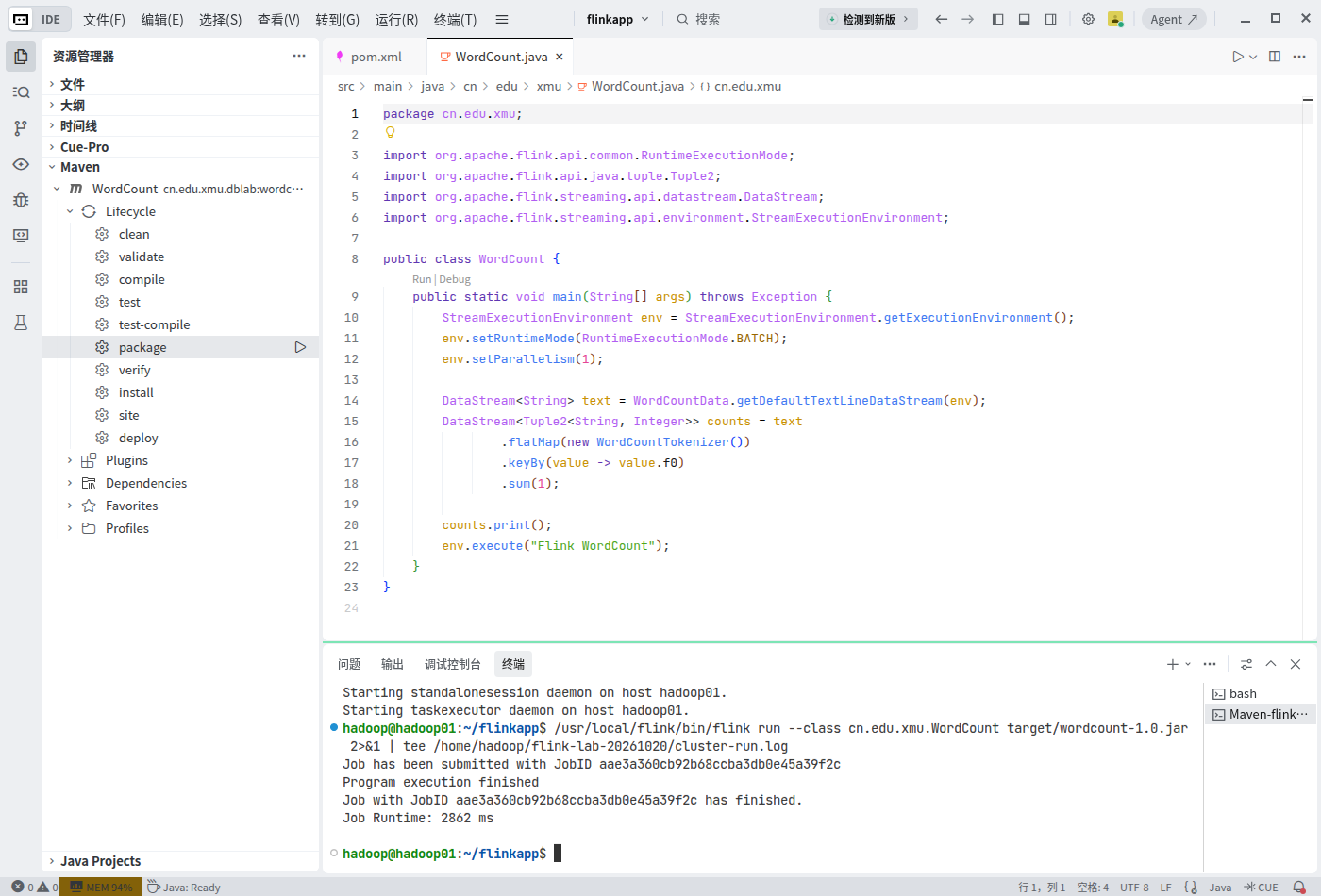
打开WordCount.java,代码如图10-2所示。
2. 在TRAE的Maven面板中打包
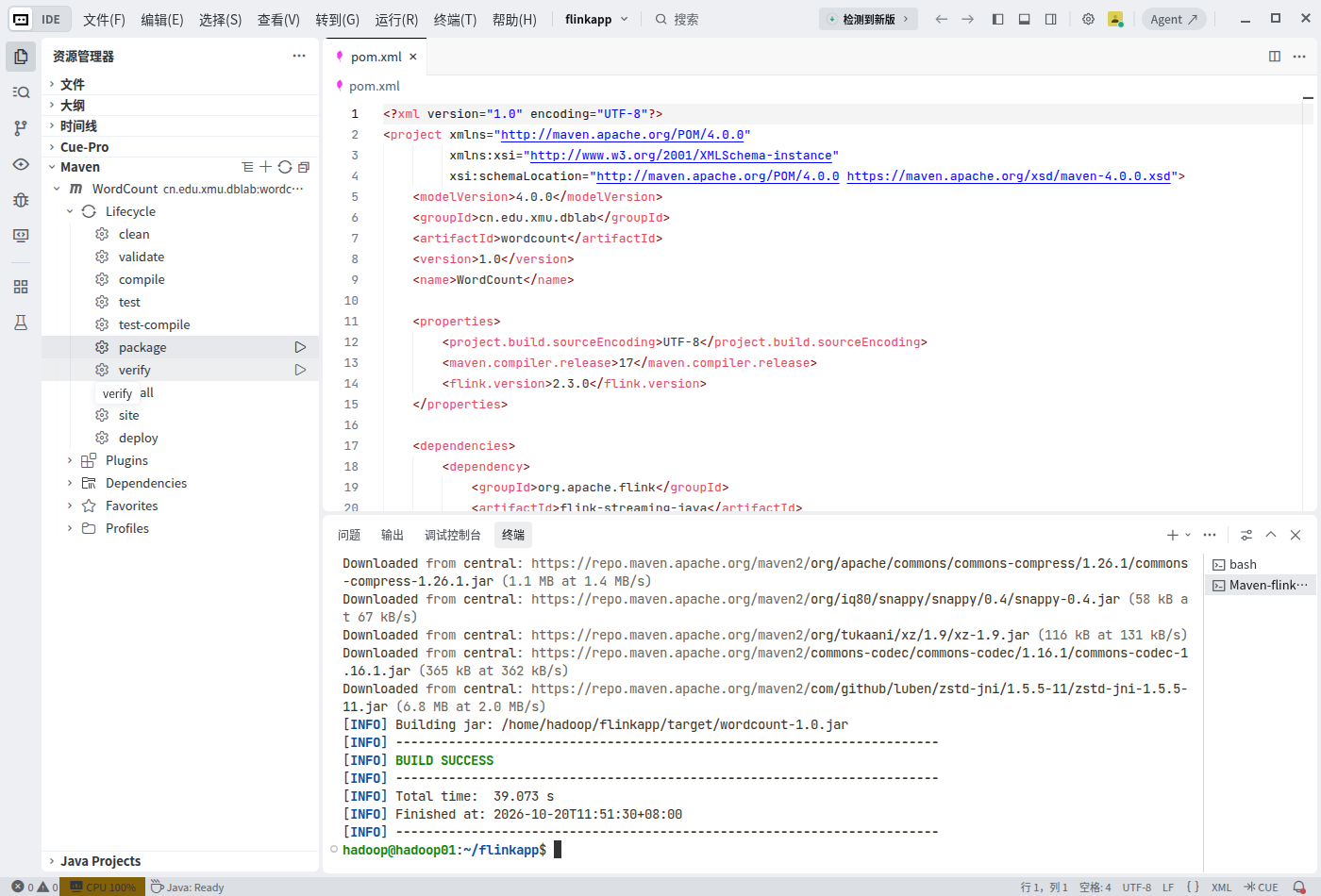
保存全部文件。在资源管理器底部展开“Maven”,依次展开“WordCount”→“Lifecycle”,找到“package”。在package上单击鼠标右键,选择“执行”;也可以点击该行右侧的三角形运行按钮。
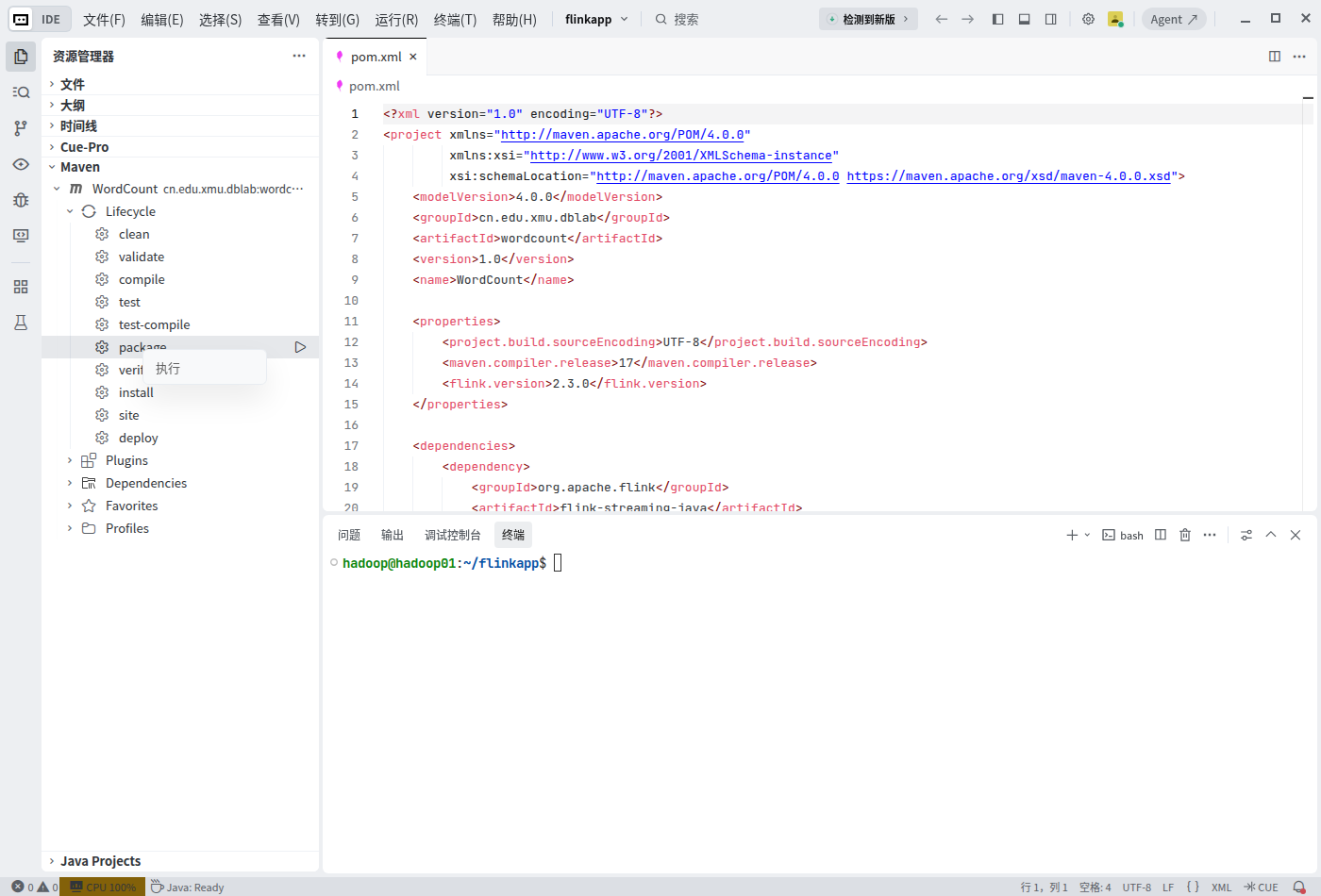
扩展会打开集成终端并调用Maven,这与在项目根目录运行mvn package的作用相同。等待终端出现“BUILD SUCCESS”,并确认生成/home/hadoop/flinkapp/target/wordcount-1.0.jar。
3. 在本地模式下检查程序
在TRAE终端中执行以下命令,在本地模式下运行程序:
cd /home/hadoop/flinkapp
/usr/local/flink/bin/flink run \
    --target local \
    --class cn.edu.xmu.WordCount \
    target/wordcount-1.0.jar
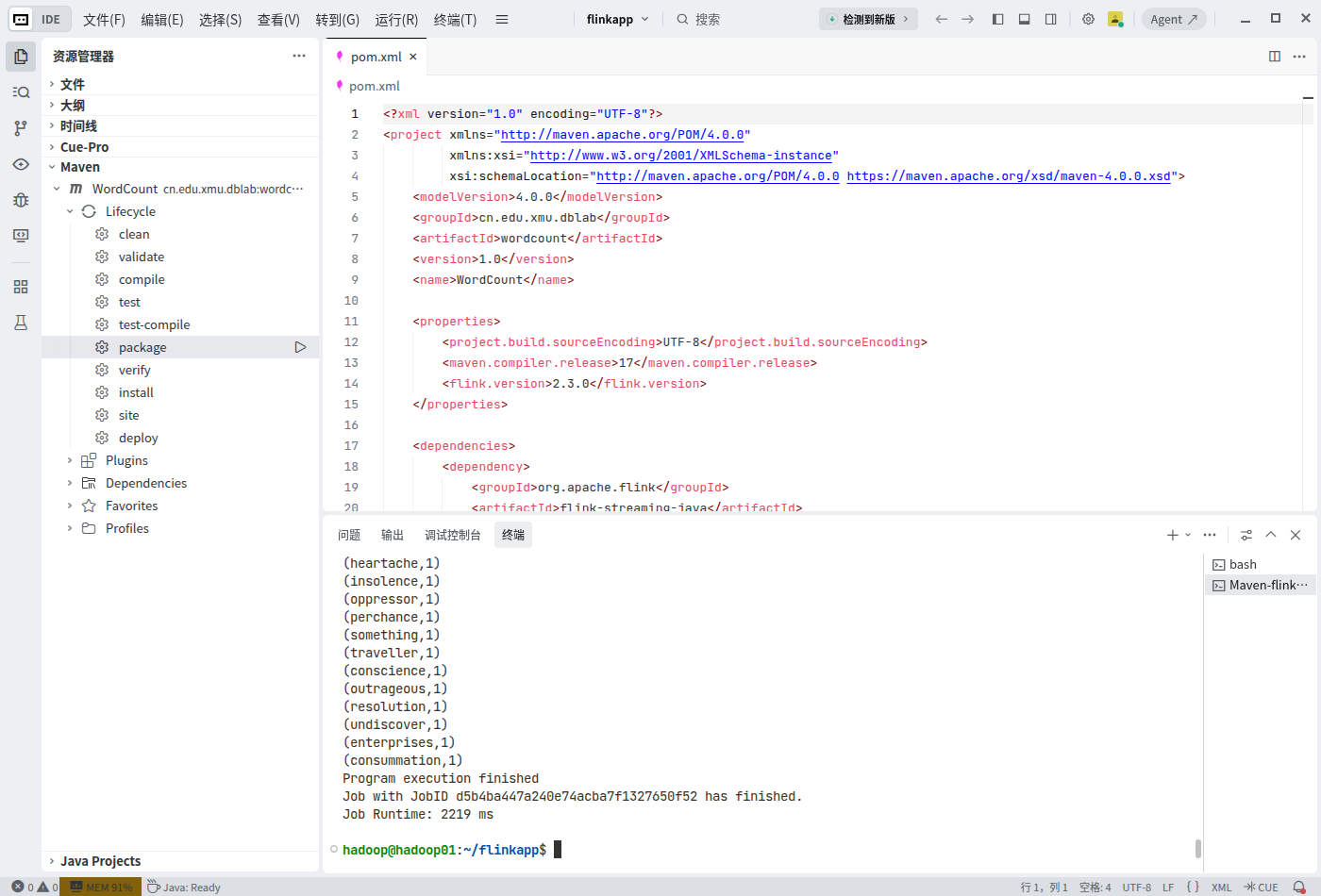
执行成功后,可以在终端中看到词频统计结果,如图10-5所示。
4. 提交到Flink集群
确认集群已启动,在同一TRAE终端按第二部分第4节执行flink run命令,去掉本地模式使用的--target local参数:
cd /home/hadoop/flinkapp
/usr/local/flink/bin/flink run \
    --class cn.edu.xmu.WordCount \
    target/wordcount-1.0.jar
执行成功后,可以看到作业运行完成的信息,如图10-6所示。
5. 在Web界面查看作业与词频
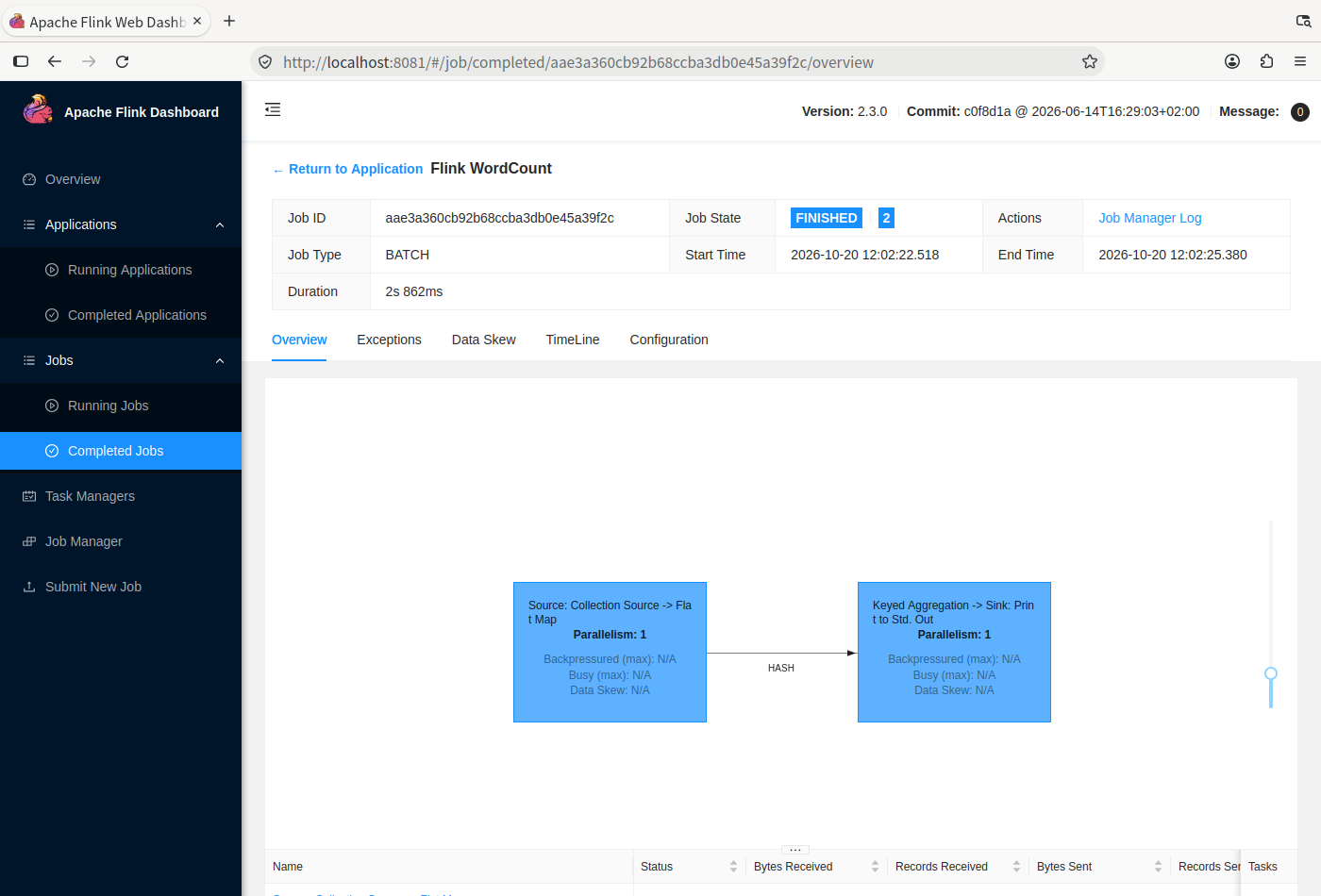
在hadoop01的浏览器中访问http://localhost:8081。展开左侧“Jobs”,选择“Completed Jobs”,打开Flink WordCount作业,确认“Job State”为FINISHED。
点击左侧的“Task Managers”,再点击列表中当前TaskManager的ID链接。
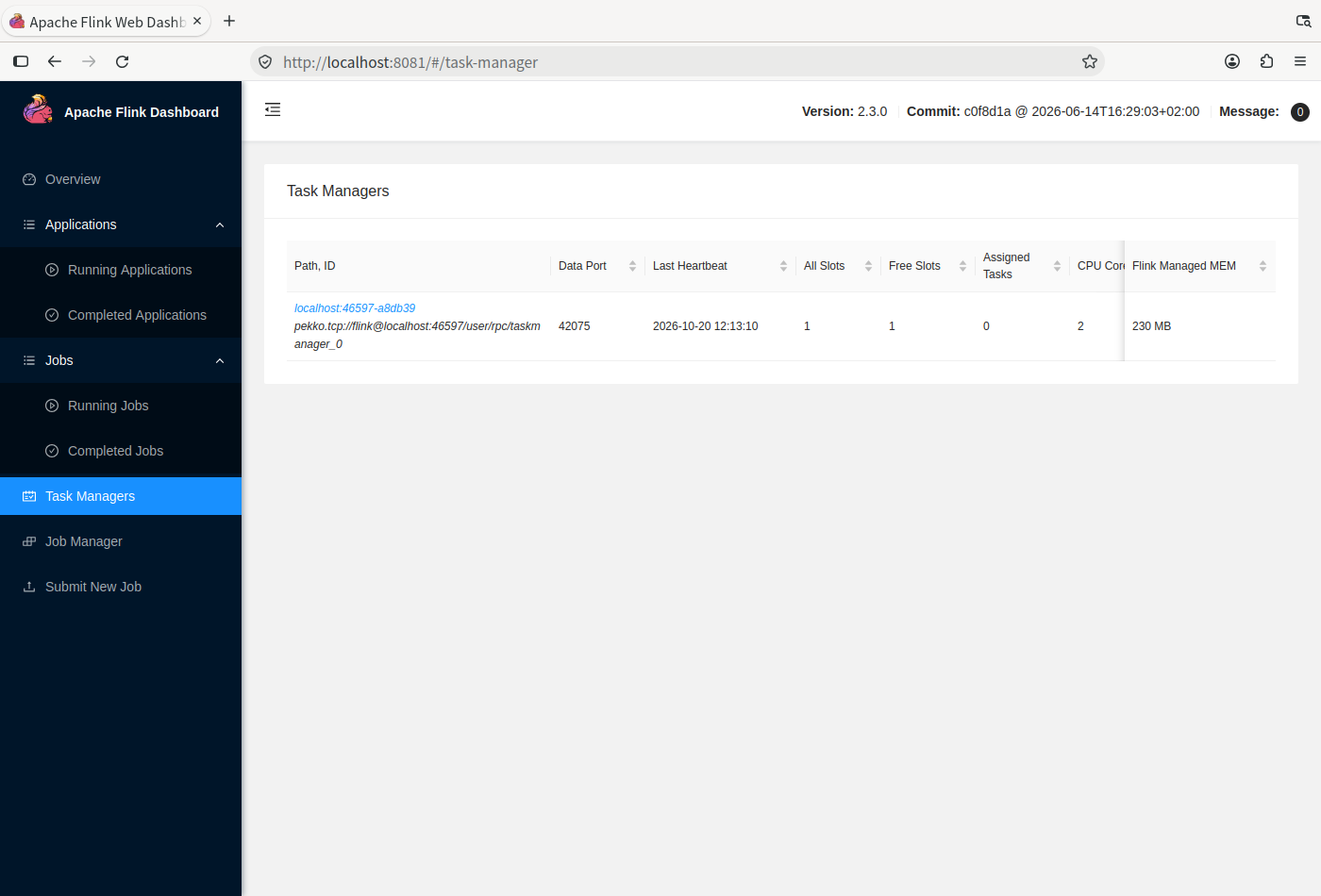
在详情页选择“Stdout”选项卡,查看标准输出中的词频统计结果。